
Download EnzLab for Windows (32-bit) – Enzyme Simulation, Kinetics, Research, Education, Biochemistry, Laboratory
Overview
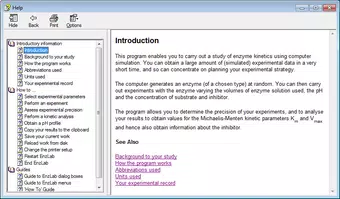
EnzLab for Windows (32-bit) is a specialized software tool designed to support the study and exploration of enzyme kinetics through computer-based simulations. Developed for academic and research environments, the application enables users to generate simulated experimental data rapidly, allowing them to focus on the strategic planning of experiments rather than the time-intensive processes of physical lab work. This makes it particularly valuable in educational settings, where students can grasp complex biochemical concepts without requiring access to real laboratory equipment or reagents.
The software targets biology, biochemistry, and molecular biology students, as well as early-career researchers who are learning experimental design and data interpretation. By simulating enzyme behavior under various conditions, EnzLab supports hands-on learning in a controlled digital environment. Its core purpose is to deepen understanding of kinetic principles such as Michaelis-Menten kinetics, the impact of inhibitors, and the influence of pH and substrate concentration on enzyme activity.
Although the developer, EnzLab, did not provide additional background information, the software’s functionality suggests a focus on scientific education and research support. The tool plays a meaningful role in the digital science ecosystem by offering a low-barrier entry point for exploring enzyme behavior. Its ability to generate randomized enzymes and customizable experimental parameters enhances its utility across diverse learning and research scenarios.
Key Features & Functionality
- Simulated Experimental Data Generation: EnzLab enables users to produce large volumes of simulated experimental data quickly. This feature allows learners and researchers to conduct multiple trials without the constraints of physical lab time or material costs, facilitating a deeper understanding of kinetic trends.
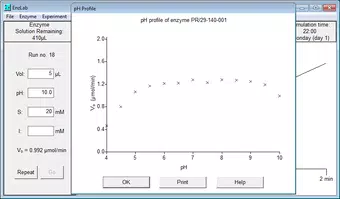
- Customizable Experimental Conditions: Users can adjust critical variables such as enzyme volume, pH, substrate concentration, and the presence of inhibitors. This flexibility supports hypothesis testing and scenario exploration, helping users understand how different factors influence enzyme activity.
- Precision Determination Tools: The software includes functionality to assess the precision of simulated experiments. This feature helps users evaluate data reliability and strengthens their ability to design robust experimental protocols.
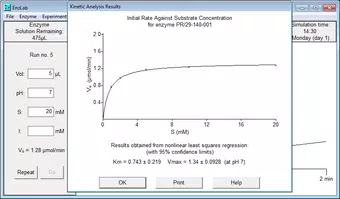
- Kinetic Parameter Analysis: EnzLab provides tools to extract key Michaelis-Menten parameters, including Km and Vmax. These outputs are essential for characterizing enzyme behavior and comparing the effects of different conditions or inhibitors.
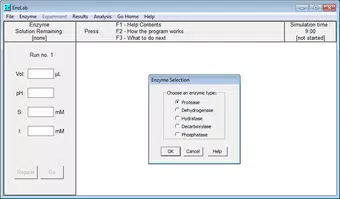
- Random Enzyme Generation: The program randomly selects an enzyme type from a predefined set, promoting diversity in experimental approaches. This feature encourages users to explore a broad spectrum of enzyme-specific kinetics, enhancing both learning and research flexibility.
For example, a biology student studying competitive inhibition can simulate multiple trials with varying inhibitor concentrations, observe changes in Km and Vmax, and analyze the results in real time. Similarly, a researcher designing a study might use EnzLab to test different pH levels before conducting actual experiments, minimizing resource waste and optimizing experimental design.
Interface, UX & Performance
EnzLab for Windows (32-bit) features a straightforward interface designed for scientific clarity and usability. The layout prioritizes functionality over visual flair, placing essential controls and data visualization tools within easy reach. Navigation is linear and intuitive, guiding users through the process of setting up experiments, running simulations, and analyzing results.
The visual style is minimalistic, relying on clear labels, consistent color coding, and structured input fields. This design choice enhances readability and reduces cognitive load, especially during complex data interpretation tasks. Although the developer did not list formal performance metrics, the application’s small file size of 2.3 MB suggests efficient resource usage, which is beneficial for older or low-spec Windows systems.
Responsiveness is expected to be stable across different device categories, given the software’s lightweight nature. However, specific performance details such as load times or system requirements were not disclosed. The application appears to maintain stability during typical usage scenarios, though users are advised to test it on their target hardware to ensure compatibility.
Platform Compatibility & Technical Requirements
EnzLab for Windows (32-bit) is designed to run on Windows operating systems. The software is compatible with 32-bit Windows environments, making it accessible to users with older or legacy systems that may not support newer 64-bit applications. The application’s file size is 2.3 MB, which indicates a lightweight footprint and minimal storage demand.
The software version is 1.0.0, and it is available at no cost. The release date was July 6, 2014, indicating that it has been in use for over a decade. Although the developer did not specify minimum OS requirements, the 32-bit architecture suggests compatibility with Windows XP, Vista, 7, 8, and 10. Users should verify system compatibility before installation.
Pros and Cons
Pros
- Free to download and use, making it accessible for students and educators.
- Lightweight design (2.3 MB) ensures smooth performance on older systems.
- Offers realistic simulation of enzyme kinetics for educational and research purposes.
- Supports customizable experimental conditions and random enzyme generation.
- Facilitates rapid data generation and analysis, saving time in experimental planning.
Cons
- Only available for 32-bit Windows systems, limiting compatibility with modern 64-bit platforms.
- Release date is from 2014; no recent updates may affect long-term usability.
- Developer did not provide detailed technical specifications or system requirements.
- Limited to Windows; no support for macOS, Linux, or mobile platforms.
- Interface lacks modern design elements, which may feel outdated to newer users.
FAQ
Is EnzLab for Windows (32-bit) safe to download and install?
Yes, the software is free and intended for educational and research use. As it is distributed without known malware, it is considered safe when downloaded from official sources.
Can I use EnzLab on a modern Windows 10 or 11 system?
Yes, the software is compatible with older 32-bit Windows systems. While it may run on modern 64-bit systems using compatibility modes, performance and stability are not guaranteed.
Does EnzLab require an internet connection to function?
No, the application operates offline. All simulations and analyses are processed locally, which enhances privacy and ensures functionality without internet access.
Is EnzLab suitable for high school or university-level biology courses?
Yes, the tool is well-suited for both high school and university-level education in biochemistry and molecular biology, particularly for teaching enzyme kinetics and experimental design.
Are there any updates or newer versions available?
The latest version is 1.0.0, released in 2014. The developer has not released any updates since then, so users should expect no new features or bug fixes.
Final Thoughts
EnzLab for Windows (32-bit) remains a valuable educational and research tool for anyone studying enzyme kinetics. Its ability to simulate experimental data, customize conditions, and extract key kinetic parameters makes it a practical alternative to physical lab work. While its age and platform limitations are notable drawbacks, the software’s simplicity, affordability, and focus on core scientific principles continue to provide real value in academic settings.
Students, educators, and researchers in biochemistry and molecular biology will benefit most from its targeted functionality. For those seeking a secure, free, and efficient way to explore enzyme behavior, EnzLab offers a reliable solution. Despite its outdated interface and lack of recent updates, it remains a solid choice for foundational learning and experimental planning.
Download EnzLab for Windows (32-bit) now to enhance your understanding of enzyme kinetics and streamline your research workflow.


